Many families are surprised to learn that 50% of older adults have already used a voice assistant in the past year, and 55% have spoken to some form of AI technology at home. Voice assistants are no longer “futuristic gadgets”, they are practical tools that can make daily life safer, simpler, and less lonely for seniors living at home.
Key Takeaways
| Question | Short Answer |
|---|---|
| 1. What is the best voice assistant for seniors living alone? | There is no single “best” option, but voice assistants designed with seniors in mind focus on simple voice commands, clear sound, and reliable routines for safety and daily tasks. |
| 2. How do voice assistants actually help with safety at home? | They can control lights, support home security devices, and help trigger alerts, especially when combined with smart safety devices and motion sensors. |
| 3. Can a voice assistant remind my parent about medication? | Yes, many families pair voice reminders with medication & health reminder devices to support consistent routines without complex apps. |
| 4. Are voice assistants hard to set up in a senior’s home? | Most work over Wi‑Fi and a simple app. We recommend following a step-by-step approach like in Start Building Your Senior Smart Home to keep things manageable. |
| 5. What should I compare: Alexa vs Google vs others? | Focus on voice clarity, ease of commands, routine automation, and how well each one ties into daily smart home routines for seniors. |
| 6. Can voice assistants work with smart lights and security? | Yes, when paired with devices like smart lighting for fall prevention and simple home security solutions, they can provide hands-free safety control. |
1. Why Compare Voice Assistants For Seniors At Home?
Many seniors already own some form of technology that supports aging at home, with research suggesting about 80% have at least one such device. Voice assistants add a “voice layer” on top of this, letting an older adult control lights, get reminders, and call family using natural speech instead of screens.
For adult children and caregivers, the goal is not more gadgets, it is safer, calmer days.
Comparing voice assistants helps us match the right device to the senior’s hearing, mobility, memory,
and comfort with technology, instead of forcing them to adjust to the device.
- Some seniors need very simple, loud responses and big displays.
- Others mainly want company, music, and easy ways to talk to family.
- Caregivers often care most about reliability, routines, and privacy controls.
When we compare options side by side, we can see which platform better fits those needs.

2. Core Features To Compare In Voice Assistants For Seniors
When we look at devices like Amazon Alexa and Google Assistant for seniors, we focus on a short list of core features. This keeps the decision understandable, even if we are not “tech people”.
| Feature | Why It Matters For Seniors | What To Look For |
|---|---|---|
| Voice recognition | Supports weaker voices, accents, or slower speech. | Low error rate, responds even from across the room. |
| Sound volume & clarity | Important for hearing changes and background noise. | Loud but clear speakers, adjustable volume, clear voices. |
| Routine automation | Reduces repetitive tasks and helps maintain structure. | Easy “good morning” and “bedtime” routines, simple triggers. |
| Compatibility | Allows control of lights, locks, and reminders by voice. | Works well with lighting, safety, and comfort devices. |
| Privacy controls | Supports trust and peace of mind for seniors and family. | Physical mic off button, clear privacy settings, controls to limit access. |
Older adults often use voice assistants for music, information, and communication.
However, the same device can also turn on hallway lights, adjust the thermostat, and remind them about
routine tasks, all with simple spoken requests.

3. Alexa Voice Assistants For Seniors: Strengths And Limitations
How Alexa Helps Seniors At Home
Our dedicated page on Alexa devices for seniors focuses on simplicity and voice-first control. Alexa is widely used in aging-in-place homes because it links easily with smart lights, plugs, cameras, and thermostats.
Alexa routines can say “Good morning”, turn on lamps, and give a weather update, all from one phrase.
This structure is especially helpful for seniors who benefit from predictable daily rhythms without
extra steps.
Where Alexa Fits Best
Alexa can be a strong choice if the senior already has, or plans to add, smart lighting and simple security devices. The ecosystem supports detailed routines that can control multiple devices together.
It also offers “drop in” or calling features to support quick check-ins with family, which many older adults appreciate for connection and reassurance.
Limitations To Keep In Mind
Most Alexa devices expect steady Wi‑Fi and some initial app setup by a family member.
Privacy features exist, but we need to review and adjust them so seniors understand when microphones are
on and what data is stored.
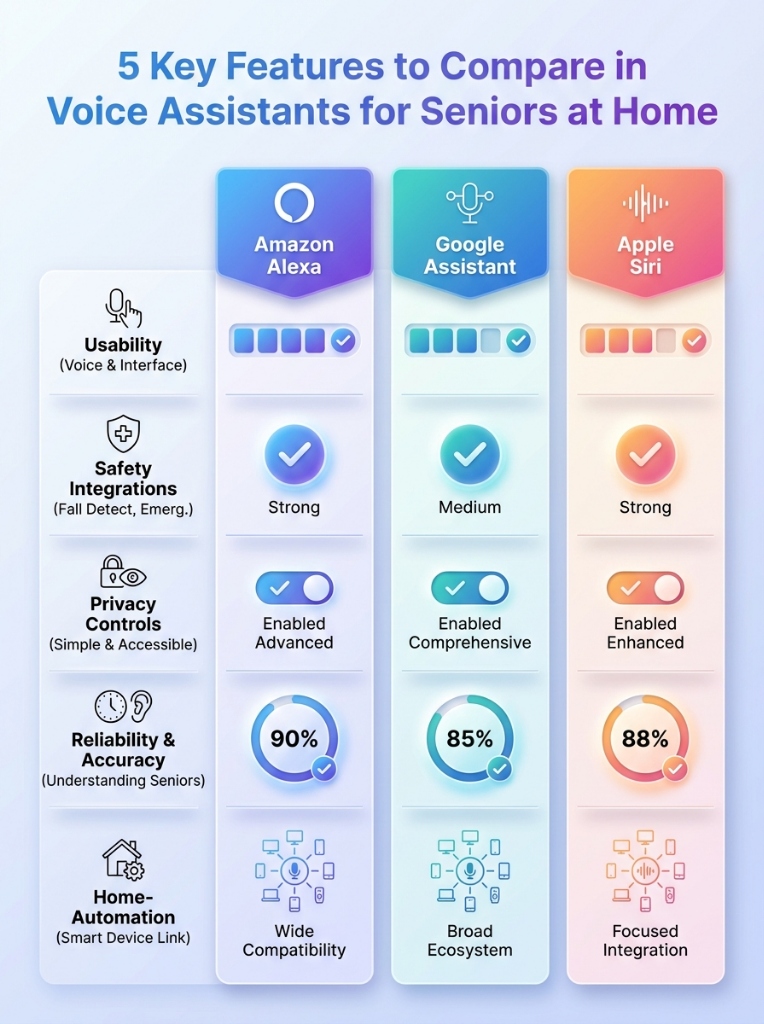
Quickly compare the top features that matter most for senior independence.
4. How Google And Other Assistants Compare For Seniors
While our site emphasizes Alexa examples, many of the same principles apply if a family prefers Google Assistant or Apple’s Siri-based devices. The core comparison remains ease of speaking to the device and how simple it is to create senior-friendly routines.
In practice, Google and Alexa both support common tasks like playing music, answering questions, and
controlling compatible smart lights.
The difference often comes down to which smartphones family members already use and which ecosystem they
know how to manage.
Voice Clarity And Understanding
Research in older adults shows an average command error rate around 4.9% in real homes, which means
almost all requests are understood when set up correctly.
Both major platforms have improved in understanding slower or quieter speech, but we still recommend
testing real commands with the actual senior before finalizing a choice.
Apps, Accounts, And Setup
Google often feels more natural if the family already uses Android phones and Google accounts.
For many households, though, the decision is simply “which assistant can the caregiver set up and
support with the least friction”.
5. Comparing Safety Benefits: Voice Assistants Plus Smart Devices
Voice assistants show their real value when we connect them with other simple devices in the home. For seniors, safety benefits often start with lighting, fall prevention, and basic home security.
Fall Prevention And Safe Nighttime Navigation
Poor lighting is a major factor in falls.
By pairing a voice assistant with smart lighting
for elderly safety and fall prevention, seniors can say “turn on the hallway light” instead of
walking in the dark or fumbling for switches.
Common combinations include:
- Voice commands to turn on bathroom or hallway lights before standing up at night.
- Automatic motion sensor lights that trigger and can also be controlled by voice.
Home Security With Voice Control
Our guide to home security solutions for seniors living alone explains how simple video doorbells, indoor cameras, and smart locks can work together. When connected to a voice assistant, seniors can ask who is at the door, turn on porch lights, or check if the front door is locked.
This reduces the need to walk to doors or windows, which can be especially important at night or in bad
weather.
Families can also receive alerts, which supports peace of mind without constant phone calls.
6. Medication Reminders And Health Routines Using Voice Assistants
Many seniors face daily challenges remembering medications and managing health tasks.
Voice assistants can provide gentle spoken reminders, while dedicated devices handle safe storage and
dispensing.
Our guide on medication and health devices for seniors living alone explains how smart pill dispensers and reminder devices work. When combined with a voice assistant, the senior can hear “It is time to take your 8 a.m. medication” plus see or hear cues from a dispenser.
Designing Simple, Non-Confusing Reminders
We recommend keeping commands and reminder names straightforward.
Instead of complicated phrasing, use routines like “Alexa, start my morning meds” or “remind me every
day at 8 a.m.” so they are easy to remember.
Health Check-In Routines
Voice assistants can also prompt gentle daily check-ins, such as asking how the senior slept or reminding
them to drink water.
These are not a replacement for medical care, but they can support consistent habits and help families
feel more connected.
7. Daily Routines: Comparing How Assistants Handle Structure And Habits
For many seniors, the most important feature is not a single skill but how the assistant supports daily structure. Our smart home daily routines for seniors guide shows how to build “Good Morning”, “Lunchtime”, and “Bedtime” sequences that work across different platforms.
Alexa and Google both allow routines that:
- Announce the time and weather in the morning.
- Turn on or off specific lights.
- Play a favorite radio station or calm music.
- Provide scheduled reminders such as “check the front door” or “prepare for an appointment”.
Usage Throughout The Day
Studies of older adults using voice-controlled devices show that usage is spread throughout the day, with
slightly higher activity in early morning and afternoon.
This pattern lines up well with routines around waking up, preparing meals, and getting ready for bed.
Keeping Routines Flexible
We encourage families to start simple and adjust over time.
A voice assistant that is slightly less “smart” on paper, but easier for the senior to understand and
control, often performs better in daily life than a highly complex setup.
8. Comfort And Temperature: Using Voice To Maintain Safe Conditions
Extreme heat or cold indoors can be risky for seniors.
Smart thermostats and comfort devices become much easier to manage when controlled by voice instead of
small, complicated wall units.
Our guide on smart comfort and thermostats for seniors living alone focuses on devices with clear displays and simple controls. When tied to a voice assistant, a senior can say “set the temperature to 72 degrees” rather than struggling with tiny buttons.
Remote Monitoring For Family
Voice-compatible smart thermostats can also allow adult children to check in on temperature remotely.
This supports peace of mind without constant calls or in-person visits, which can be especially helpful
for long-distance caregivers.
Balancing Comfort And Simplicity
We recommend starting with a single zone or a few key rooms instead of the entire home.
That way, the senior only needs to remember a few basic commands, and we can adjust the system as they
become more comfortable.
9. Privacy, Trust, And Independence When Using Voice Assistants
Some seniors are excited about voice assistants, while others worry about being “listened to”. Around 54% of older adults say they trust AI content, while 46% do not, which means we must respect both comfort levels.
When we compare voice assistants, we pay close attention to:
- Clear microphone on/off controls, ideally with a physical button and visible light.
- Simple explanations about what is recorded, what is not, and how to delete history.
- Ability to limit who can drop in or call through the device.
Supporting Independence, Not Surveillance
Our goal is to use technology to support independence, not to track every move.
By giving seniors control over privacy settings and explaining them in plain language, we help them feel
respected and more willing to use the assistant daily.
Caregiver Access And Boundaries
Families should decide in advance who can make changes to routines or settings.
We suggest one or two trusted caregivers handle configuration, while the senior focuses on simple daily
commands.
10. Step‑By‑Step: How We Recommend Choosing A Voice Assistant For A Senior
Choosing a voice assistant for an older adult does not need to be overwhelming. We use a simple, step-by-step approach similar to the framework in Start Building Your Senior Smart Home.
- Assess the home basics. Confirm Wi‑Fi coverage where the device will sit and identify the rooms where voice control helps most, such as bedroom, living room, and hallway lights.
- List top priorities. Safety (lights, door), connection (calls, messages), or structure (routines and reminders).
- Match to a platform. Choose Alexa, Google, or another assistant largely based on which ecosystem family can easily support over time.
- Start small. Begin with one speaker or display and a single routine like “Good morning”. Add medication reminders or extra devices only after the senior is comfortable.
- Review privacy together. Explain microphone controls, calling permissions, and how to stop or mute the device at any time.
This process helps avoid overwhelm and builds confidence step by step.
We find that once seniors see the assistant responding reliably to daily commands, they often ask for
more features on their own.
11. Practical Comparison: Which Assistant Fits Which Senior Best?
To bring everything together, it helps to compare voice assistants based on typical senior situations instead of just technical features. The best choice is the one that fits the person, the home, and the caregiver support available.
| Senior Situation | What To Prioritize | Voice Assistant Considerations |
|---|---|---|
| Lives alone, high fall concern | Lighting control, motion lights, simple security. | Choose an assistant that works smoothly with smart lighting and doorbells to reduce nighttime walking and door answering risks. |
| Struggles with remembering tasks | Medication reminders, daily structure, spoken prompts. | Look for easy routine setup and clear voice reminders that link to pill dispensers or reminder devices. |
| Low vision, limited mobility | Hands-free operation, strong speakers, simple phrases. | Any assistant can work, but test voice clarity and the device’s ability to hear commands from across the room. |
| Feels isolated or lonely | Easy calls, music, radio, basic companionship. | Prioritize simple calling features and routines that encourage regular contact with family or friends. |
When we compare Alexa, Google, and other assistants through this lens, the decision often becomes
clear.
The right device is the one that seniors can speak to comfortably, that responds reliably, and that
quietly supports their independence every day.
Conclusion
Comparing voice assistants for seniors at home is less about technical specifications and more about daily life. We look at how easily an older adult can speak to the device, how reliably it responds, and how well it supports safety, structure, and connection.
Whether you choose Alexa, Google, or another assistant, start small, focus on one or two helpful routines, and connect it to a few carefully chosen devices like smart lighting or simple security. With that approach, a voice assistant becomes a calm, steady helper in the background, supporting independent living with clear, compassionate technology.